

Intempt
All free tools
Marketing

Free AI newsletter generator.

Write an email newsletter from a topic, goal, and audience. You get five subject lines, preview text, an intro, sections, and a sign-off CTA. In Blu, the Lifecycle Marketer agent sends it on the journey and reports which product events each section drove.

How to use the AI newsletter generator

It takes three steps and every output renders on this page so you can copy or export it right away.

Add the topic and audience

Type the topic and who's reading, then pick informational, promotional, or product update. Add what the last issue covered if it's part of a series.

Generate the draft

The AI newsletter generator returns five subject lines, preview text, an intro, 2 to 4 main sections, and a sign-off with a CTA.

Open it inside Intempt

Push the issue into a lifecycle flow so the Lifecycle Marketer agent sends it to the right segment, protects deliverability, and reports which product event it drove.

Use in Claude

Blu Agent

Who it's for

  • Content and lifecycle marketers drafting a recurring newsletter
  • Teams planning a whole editorial calendar instead of one issue at a time

What's in the download

  • SKILL.md - The same 5-part issue structure from the browser tool (subject lines, preview + intro, main content, sign-off/CTA) and its no-invented-facts rule, plus instructions for drafting a whole editorial calendar of issues in one pass.

How to install it

claude.ai or Claude Desktop
Upload as a zip in Capabilities
Paid plan
  1. Open Settings, then Capabilities
  2. Turn on code execution if it isn't already on
  3. Upload the .zip you downloaded
Requires a Pro, Max, Team, or Enterprise plan. Not available on the Free plan.
Claude Code
Drop the folder, it auto-loads
Any plan
  1. Unzip the download
  2. Drop the folder into ~/.claude/skills/ (or .claude/skills/ in a project)
  3. Claude Code finds it automatically
$ ls ~/.claude/skills/
your-new-skill/

What you need

  • Claude Desktop or claude.ai (Pro, Max, Team, or Enterprise for claude.ai upload)
  • Claude Code: no plan restriction

Try it with

  • “Use the newsletter-generator skill to draft this issue: topic Q3 product roundup, goal product update, audience existing customers”
  • “Read this editorial calendar of 6 upcoming issues and draft each one”

Prefer an instant answer? Run it now above.

What you get from the AI newsletter generator

What it does on this page, and what it does inside Intempt.

Email newsletter drafts from a topic, goal, and audience

  • A topic and an audience are enough to start
  • The goal you pick sets the framing, from no pitch to a clear offer
  • Past-issue context keeps a running series connected
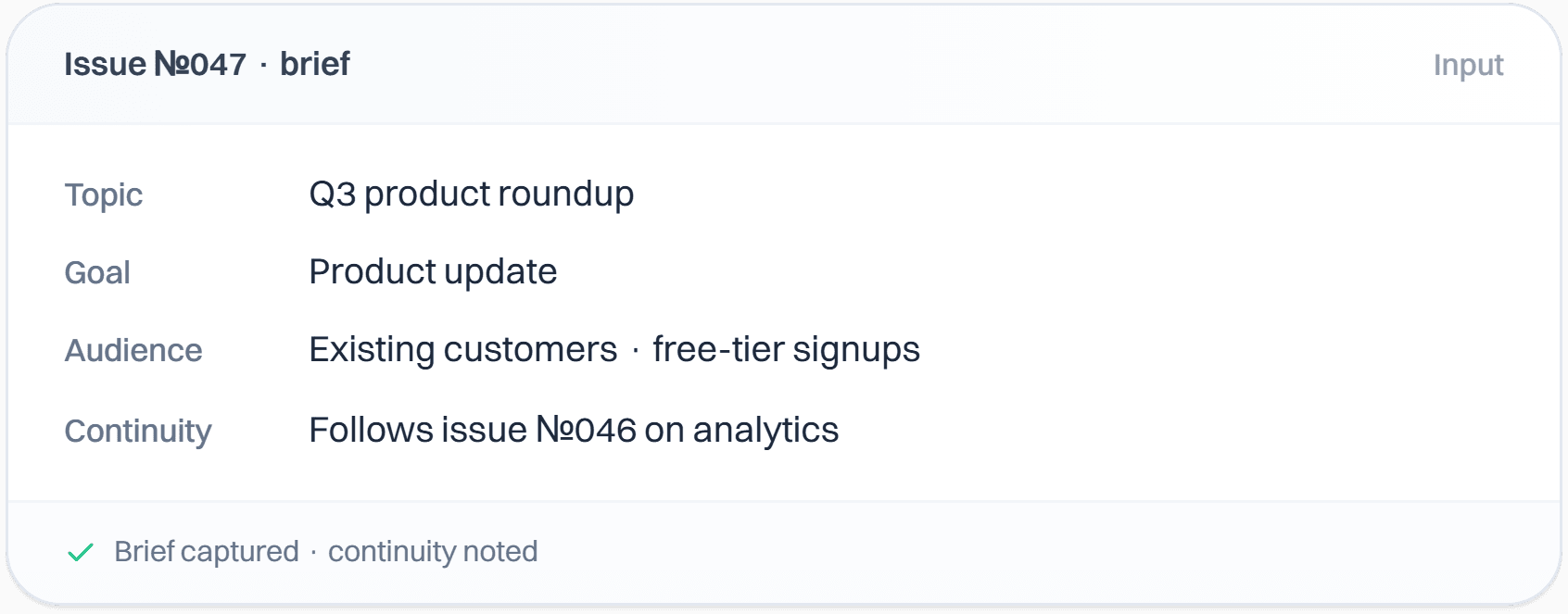
A newsletter brief for issue 047 with the topic Q3 product roundup, the goal product update, an audience of existing customers and free-tier signups, and a note that it follows issue 046.

A newsletter template that keeps its shape every send

  • Five subject line options, each under 60 characters
  • Preview text, an intro, and 2 to 4 main sections
  • The draft only uses facts you gave it, with no invented stats
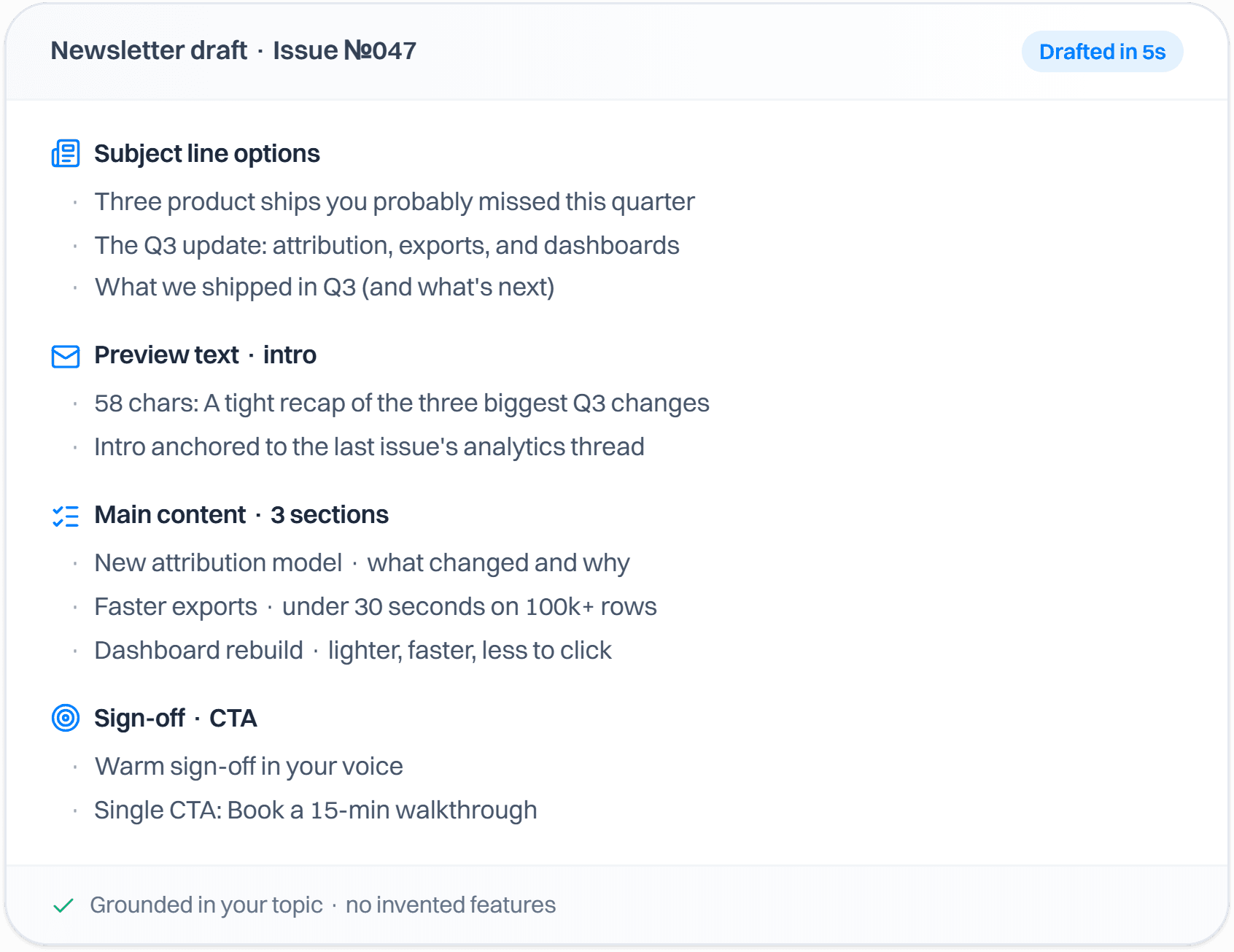
A newsletter draft for issue 047 listing subject line options, preview text, three main content sections, and a sign-off with one CTA.

Send to the segment that actually reads

  • Filters by engagement and lifecycle stage automatically
  • Unengaged contacts are suppressed before they cost you deliverability
  • Product usage counts as a signal, not just opens
Newsletter audience segment inside Intempt with engagement and stage filters.

The send and the product event, in one system

  • Signups and trials trace back to the issue that drove them
  • No copy-paste between the sending tool and the analytics tool
  • You can see engagement section by section
Newsletter sections tracked through to signups and revenue, not just opens.

See it work on your own output.

Start free

Questions about theAI newsletter generator.

Yes. Sign up for the free Intempt plan, then generate issues on this page and copy or download the output free 3 times a day, and up to 10 times a day across all the tools. Segmenting, personalizing, and tracking downstream revenue sit inside the free Intempt plan.

Teams love it

They stopped stitching tools andhired one system.

StockInvest

Acquisition and retention are one connected motion. Personalizing the path before signup only pays off when the same system carries the user through onboarding afterward.

Anonymous traffic was not turning into registered users, and acquisition and retention were run as two separate problems. We ran Experiences on the anonymous visitor flow to put the right content and CTAs in front of each visitor, then handed new signups to automated Journeys for onboarding and deeper engagement.

455,396

users instrumented

Read the full research
FieldsUSA

Judge experiments on revenue per visitor instead of conversion rate. A variant can win on conversions and still lose on revenue, and repeat buying only shows up when the whole journey is in one view.

High-intent shoppers browsed a large, specialized outdoor catalog, and browsing, product interest and purchase history sat in different places. We unified them into one customer view, then ran real-time personalization, intent-based segmentation and timely follow-ups on top of it, judging experiments on revenue per visitor.

Read the full research
Hoperfy

Build the pipeline on observed signals. When follow-ups trigger on intent, the team spends its time on the users who are genuinely engaging.

Static lead lists and timeline-based follow-ups were hiding who was actually engaging. We ran a signal-led outbound pipeline where follow-ups fire on real behavior: outbound replies, onboarding progress and product usage.

Read the full research

Send to the right list.

Segments on real engagement, suppresses before deliverability suffers, and ties the send to the product event.

Start for free